Authors

Today, we’re excited to introduce Unstructured Transform. We’ve rebuilt our core parsing pipelines and trained a new generation of models to take document parsing a step further, with better accuracy on complex tables, forms, and scans, and a simpler API to get started.
There’s an easy assumption to make about document parsing: frontier models read documents well enough that you can skip a dedicated parser. It’s reasonable because these models really are good at reading a page. But recognizing the text is only part of the job. Values need to stay attached to the right rows and columns, and the output also needs to stick to what’s actually present in the document.
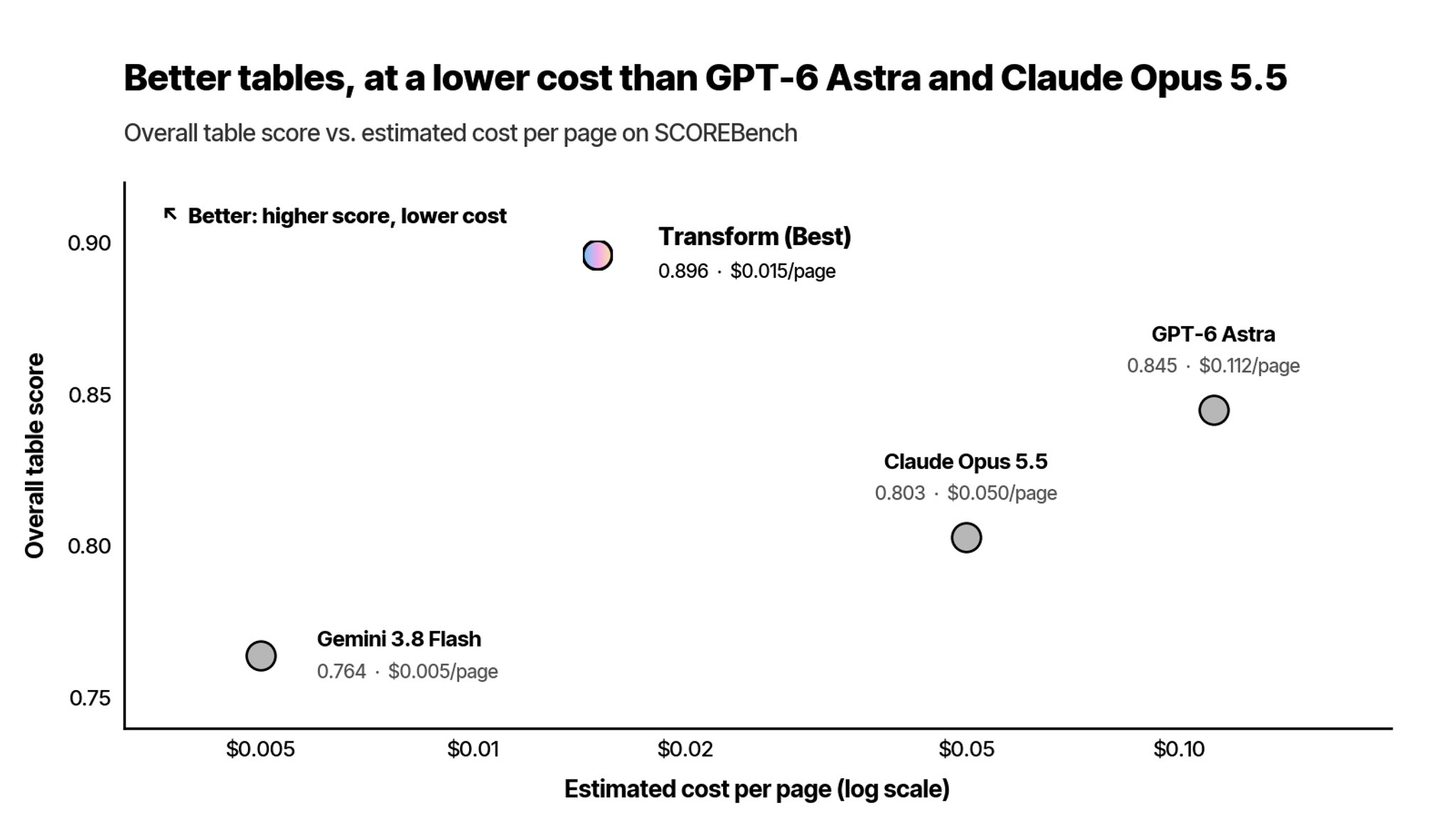
To test that assumption, we ran Transform alongside GPT-6 Astra, Claude Opus 5.5, and Gemini 3.8 Flash on the same 224 pages of real-world documents.
Every system recognized most of the text. The differences were in what they added and how they handled tables.
The frontier models had hallucination rates roughly 50% higher than Transform’s, while they extracted almost all the text, they also invented a lot of spurious text. Transform also scored higher on tables than all three, at about one-seventh the estimated cost of GPT-6 Astra and one-third the cost of Claude Opus 5.5. Gemini 3.8 Flash was cheaper than Transform, but had the lowest table score.
Those cost differences add up. At the estimated rates in this test, processing 100,000 pages would cost $11,200 with GPT-6 Astra, $5,000 with Claude Opus 5.5, or $1,500 with Transform. With Astra and Opus, you would be paying more for slightly higher text recognition, while getting lower table scores and more hallucinated text.
Foundation models are built to handle a broad range of tasks. Reading documents is one of them, but that doesn’t make them the best choice for every part of document processing. In addition to text extraction, a dedicated parser can also focus on the details downstream applications need: which header applies to a value, how cells span a table, and what the document actually says.
A cheaper model may be enough for straightforward text. But if your application depends on complex tables or uses extracted values to make decisions, the price per page only tells part of the story. You also need to consider whether the output is accurate enough to use.
The challenge is in the layout.
Companies use Unstructured Transform to extract the terms of a loan, the details of an insurance claim, the results of a lab test, or the parts needed to manufacture a product.
That information often sits in tables with merged, multi-level headers, forms with dozens of paired fields, and pages degraded by repeated scanning. Reading an individual number correctly isn’t enough if it gets assigned to the wrong field or column.
Teams already use Transform for this work. They asked us to improve tables and forms further, so we focused on how Transform identifies and processes those regions.
What we learned building it.
Earlier this year, we wrote about composability in table parsing. Complex tables require spatial, semantic, and structural reasoning. Breaking the work into steps lets each step focus on a specific task.
Transform applies that approach to the whole page, guided by two principles.
Use the context each decision needs. Some questions need a close look at one region: is this a table, a form, or a paragraph, and what does it say? Others need broader context: what level is this heading, and which figure does this caption describe? Separating those tasks lets Transform use the relevant context for each.
Give difficult regions focused attention. A dense financial table can lose detail when read as one part of a crowded page. Processing it separately helps preserve merged headers, spanning cells, and the relationships between values. The larger and more complex the table, the more that attention matters.
Beyond tables
Tables showed the largest gap in this comparison. But preserving the rest of the document matters too, especially when an agent uses the output to make decisions.
When a person reviews parsed output, they have a chance to catch a missing line or a misplaced number before acting. An agent may review a credit agreement, route a claim, or pull figures from a 10-K without someone checking each step. Errors in the parsed document can then affect the decisions that follow.
Document structure gives the agent context too. Transform preserves heading levels and links captions to figures, so an agent can locate the section it needs or read a chart with the caption that explains it.
What you can build with it.
Four things teams do with Transform today:
- Pull fields from forms and filings. Define the fields you need once and get typed key-value pairs from each document: covenants and rates from a credit agreement, fields from an ACORD form or prior-authorization request, or defined terms from a contract.
- Extract dense, complex tables. Get tables as grids with rows, columns, and merged cells preserved. Financial statements, lab panels, and bills of materials become structured data your application can use.
- Make figures and charts usable. Get plain-text descriptions alongside charts, diagrams, and photos. A damage photo or engineering diagram becomes searchable, and its content becomes available to downstream applications.
- Trace values to their source. Page and location information lets you check an extracted figure or clause against the original document.
From the browser to your application.
Upload a document in the browser and inspect the result as a formatted page, Markdown, or JSON. Describe the fields you want and get them back as key-value pairs.
When you’re ready to use it in your application, select Get Code and copy a Python, TypeScript, or cURL snippet that runs the same configuration.
Try it yourself!
These improvements are available today in Unstructured Transform. Try it on your hardest documents and tell us what you build.
And read the full press release here.