Authors

For years, Unstructured has promised to take your unstructured data and turn it into content your agents and AI applications can trust. But your data was never just documents.
Your S3 buckets and Google Drive hold countless customer calls, training videos, webinars, and more; all waiting to be transformed. Today, Unstructured turns those recordings into source-timed JSON elements, so AI applications and agents can put that context to work.
Unstructured’s element ontology is centered around textual and graphical elements. Titles, paragraphs, tables, and other meaningful units. Audio and video pushed us to extend that through time. What is the meaningful unit when content unfolds as it plays rather than just sitting statically on a page?
Multimedia processing firmly places new elements in our model. Speech in a recording becomes a TranscriptFragment. A camera panning over a scene becomes a SceneDescription. Each element carries its position in time, so applications can piece together what was said and shown rather than treating recordings as an opaque blob of bits.
A NASA video, broken into elements
Let’s take NASA's The Zero Gravity Coffee Cup. The video explains a practical (and terrifying) problem in space: without the help of rocket scientists you may find yourself without your necessary shot of caffeine.
The narration and visuals in the recording provide a useful way to tie together what people are saying with what they’re doing and demonstrate how structured media can create a cohesive picture for agents.
This recording was run through our new Multimedia Partitioner, returning ten TranscriptFragment and nine SceneDescription elements. Toward the end, the visual description catches a detail the narration alone would miss: five astronauts raising small clear containers in a toast, hopefully well caffeinated. Each observation is pinned to its time in the recording, allowing them to be joined by downstream applications.
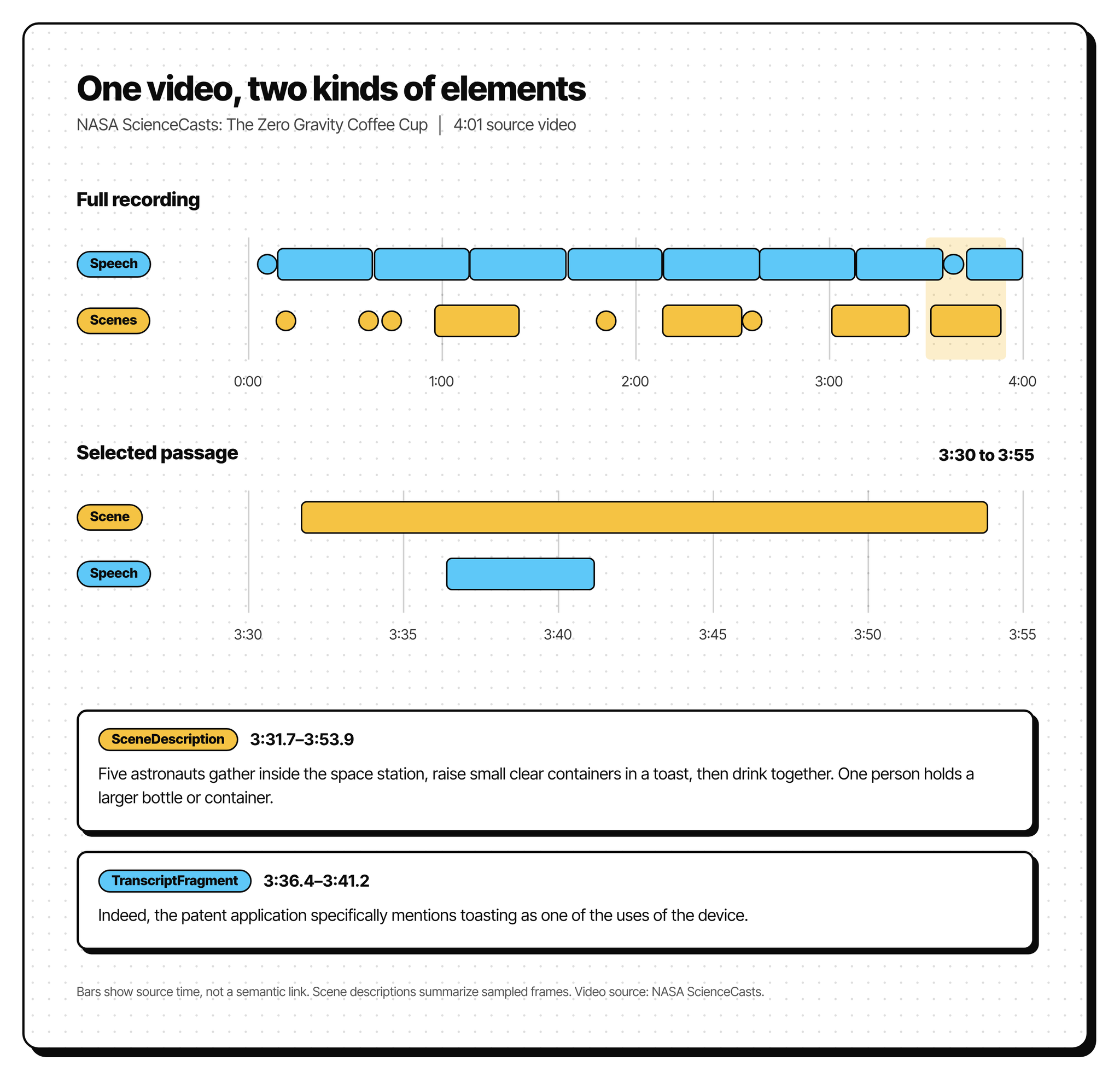
Here are the two elements from that passage (additional metadata removed for legibility):
[
  {
    "type": "SceneDescription",
    "text": "Five astronauts gather inside the space station, raise small clear containers in a toast, then drink together. One person holds a larger bottle or container.",
    "metadata": {
      "start_time": 211.7,
      "end_time": 233.9,
      "filename": "ScienceCasts-_The_Zero_Gravity_Coffee_Cup-3bd40db2.webm"
    }
  },
  {
    "type": "TranscriptFragment",
    "text": "Indeed, the patent application specifically mentions toasting as one of the uses of the device.",
    "metadata": {
      "start_time": 216.448,
      "end_time": 221.168,
      "filename": "ScienceCasts-_The_Zero_Gravity_Coffee_Cup-3bd40db2.webm"
    }
  }
]
With video transcription enabled, speech and scene descriptions from a video are joined in one file, ordered by when they appear. The start_time and end_time fields allow applications to place both observations in the recording without requiring agents to spend tokens and time to interpret the media file itself.
How speech and video land on one timeline
Transcriptions are not just about what was said; it’s also about who said it. Our audio processing handles speech recognition and speaker labeling (diarization) as separate tasks.
In parallel, video frames are sent to a vision model to extract metadata and holistically describe the scene. The ordering puts speech and visual observations on the same timeline. Semantic linkage is left to downstream applications while Unstructured provides the temporal relationships.
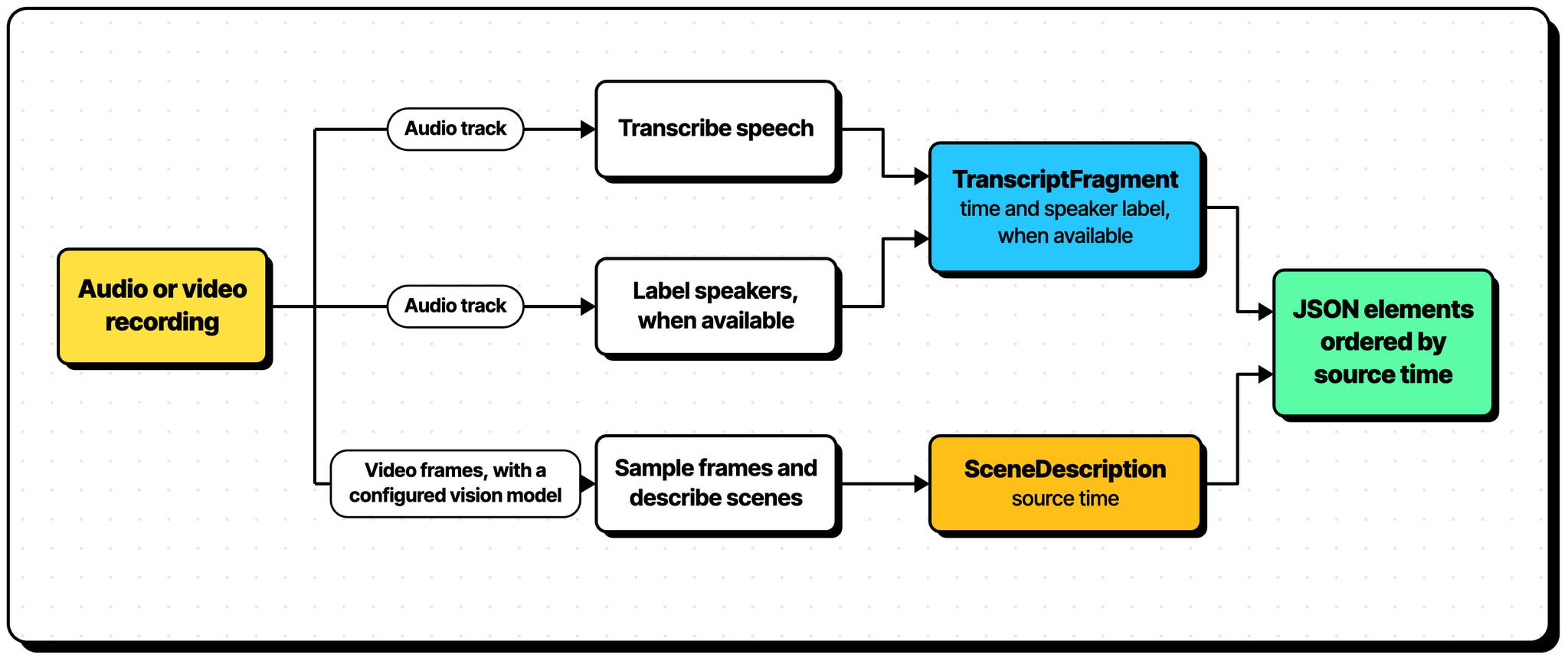
Diarization presents fundamentally different problems than transcription, providing our partitioning with an opportunity to shine. A voice heard at the beginning of a recording may go silent, only to return at the end. Our pipeline reconciles speaker labels across windows, grouping individual pieces of speech by voice within a recording.
The NASA TranscriptFragment above was condensed, removing some pieces of metadata for demonstration, but if we bring a few fields into view (namely speaker and speaker_scope) you can see diarization in action. SPEAKER_00 represents a global identifier for this voice across the entirety of the recording. Each speaker in a recording will share this structure of SPEAKER_NN where NN is the identifier.
{
  "type": "TranscriptFragment",
  "text": "Indeed, the patent application specifically mentions toasting as one of the uses of the device.",
  "metadata": {
    "start_time": 216.448,
    "end_time": 221.168,
    "speaker": "SPEAKER_00",
    "speaker_scope": "global",
    "filename": "ScienceCasts-_The_Zero_Gravity_Coffee_Cup-3bd40db2.webm"
  }
}
Meanwhile, on the video lane, we sample frames throughout a window (where a window is 300 seconds long) and select frames around visual changes. Those are sent to a vision model which describes scenes, identifies objects, and reads visible text. This approach allows us to conserve valuable time (and tokens) while providing the necessary visual context for AI-powered applications.
At about 2:36 in the NASA recording, the camera shows a fluid experiment inside the station. Expanding the SceneDescription to show more selected fields, we can see the objects, activities, and text read from the sampled frames.
{
  "type": "SceneDescription",
  "text": "A clear mechanical fluid apparatus is shown mounted inside the space station. It contains reddish liquid, blue adjustment knobs, a numbered circular scale, and a small timer display.",
  "metadata": {
    "start_time": 155.8,
    "end_time": 156.9,
    "objects": [
      "fluid experiment apparatus", "transparent chamber", "red liquid",
      "timer", "numbered dial", "blue knobs", "space-station wall"
    ],
    "activities": ["displaying an experimental device and timer"],
    "on_screen_text": [
      "science @ NASA", "20", "30", "40", "50", "60", "70", "80",
      "0:30:36", "HR", "MIN", "SEC", "T1", "T2", "T3", "T4", "CDN"
    ]
  }
}
The models behind the magic
Our initial speech path uses Parakeet TDT 0.6B v3 to transcribe speech and pyannote Community-1 to mark speaker turns within each audio window. WeSpeaker’s embedding model helps match the same voice across windows, so its speaker label can remain consistent when it returns later in the recording. Video scene descriptions can use a separately configured vision model from a supported provider. Our architecture also supports OpenAI-compatible inference backends for both transcription and scene descriptions.
Keeping model selection separate from the element contract was an important consideration as we continue to extend the Unstructured platform’s deployment flexibility to structure multimedia content. The inference layer is designed to accommodate different models and hosting environments while preserving the element ontology.
Try it with your own recordings
Unstructured's promise has always been broader than what appears on a page. Audio and video extend that promise to truly structure all unstructured data.
Open Unstructured and add the Multimedia Partitioner to a workflow. Run an audio or video file, then inspect the JSON. Follow the multimedia setup guide to get started!