
Authors

Unstructured sits at the start of most AI pipelines. Documents come in from wherever they live, move through a series of processing nodes, and land structured and ready at your destination.
Today, we're shipping webhooks. When jobs are scheduled, start, complete, stop, or fail inside Unstructured, a signal fires automatically to any endpoint you control. The rest of your stack responds the moment it happens. Trigger downstream pipelines, send notifications, or connect to any tool in your system.
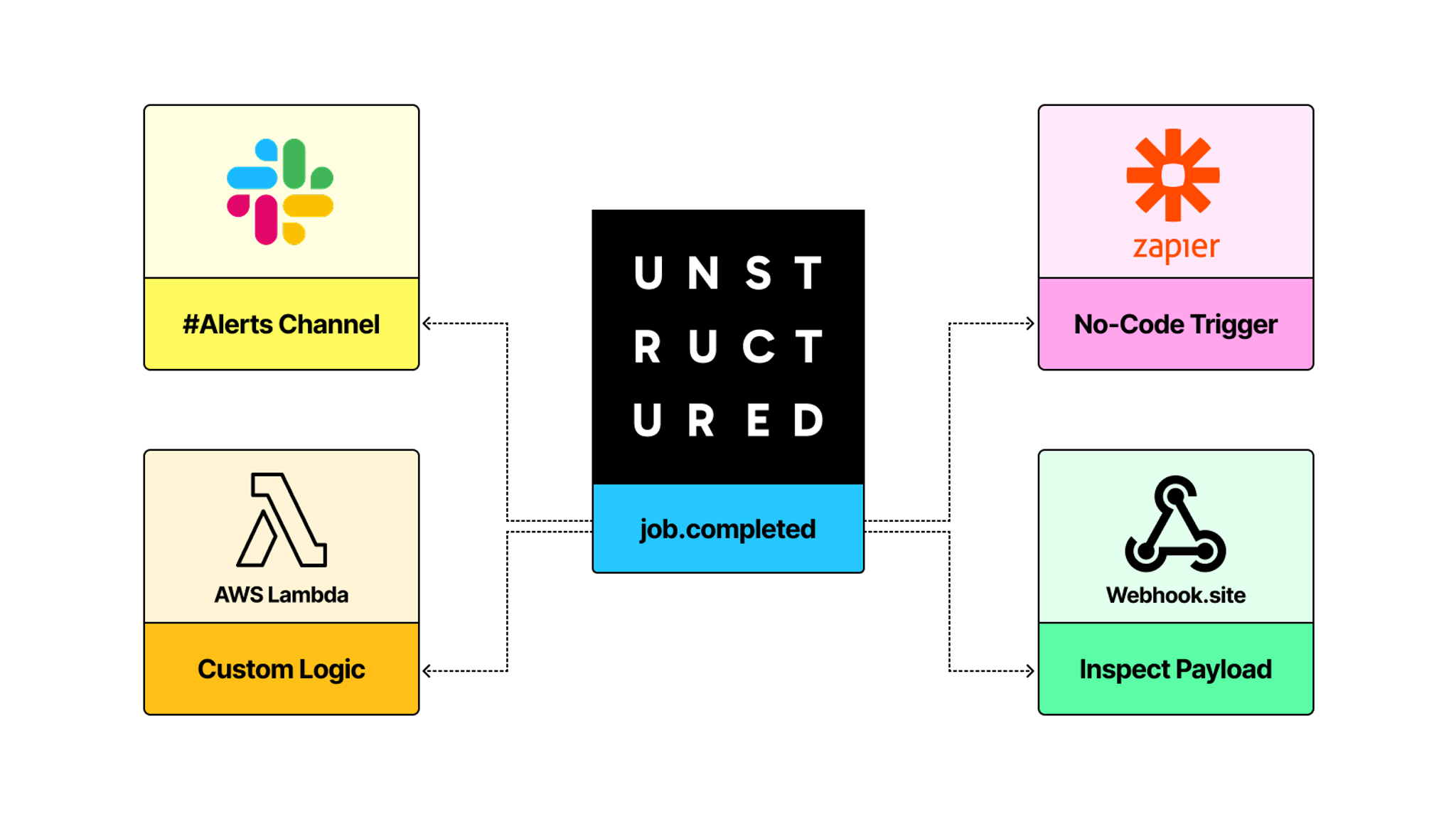
What fires a webhook
A webhook in Unstructured fires on job events. Every job that runs against a workflow can generate a signal at five points in its lifecycle:
job.scheduled: the job is queued to runjob.in_progress: the job has started processingjob.stopped: the job was stopped before completingjob.failed: the job did not initialize or processed no filesjob.completed: the job initialized and finished processing. To determine whether all files were processed successfully, get the job’s processing details.
When Unstructured fires one of these events, it sends an HTTPS POST to your endpoint with a JSON payload. That payload tells you what happened, which job triggered it, and which workflow it belongs to.
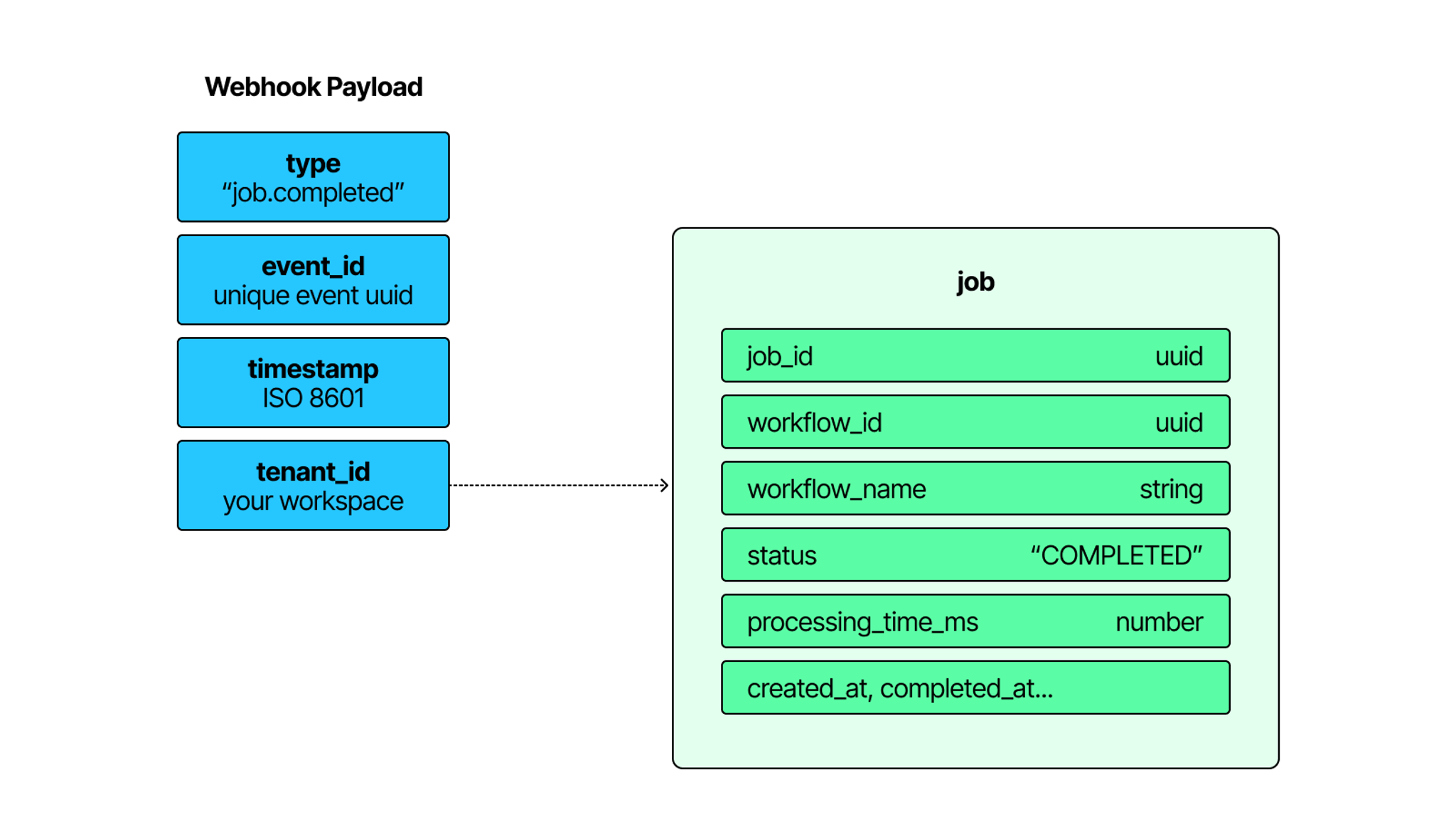
The type field tells you which event fired. The job object gives you the job_id and workflow_id you need to take action or fetch more detail. processing_time_ms tells you how long the job ran.
Alongside the payload, every request carries three headers: webhook-id, webhook-timestamp, and webhook-signature. These are used to verify that the request genuinely came from Unstructured. More on that in the getting started section.
For the full payload reference, see the Unstructured webhooks documentation.
Workspace and workflow
Webhooks in Unstructured can be scoped two ways. The scope determines which jobs trigger it.
A workspace-scoped webhook fires on events from any job across your entire workspace. If you want visibility into everything running in your account — failures, completions, anything — this is the right level. A single endpoint that receives signals from every workflow you have.
A workflow-scoped webhook fires only on jobs belonging to a specific workflow. This is the right choice when the reaction is specific to what that workflow does. A long-running ingestion pipeline completing should notify the team that owns that data. That signal doesn't need to go everywhere.
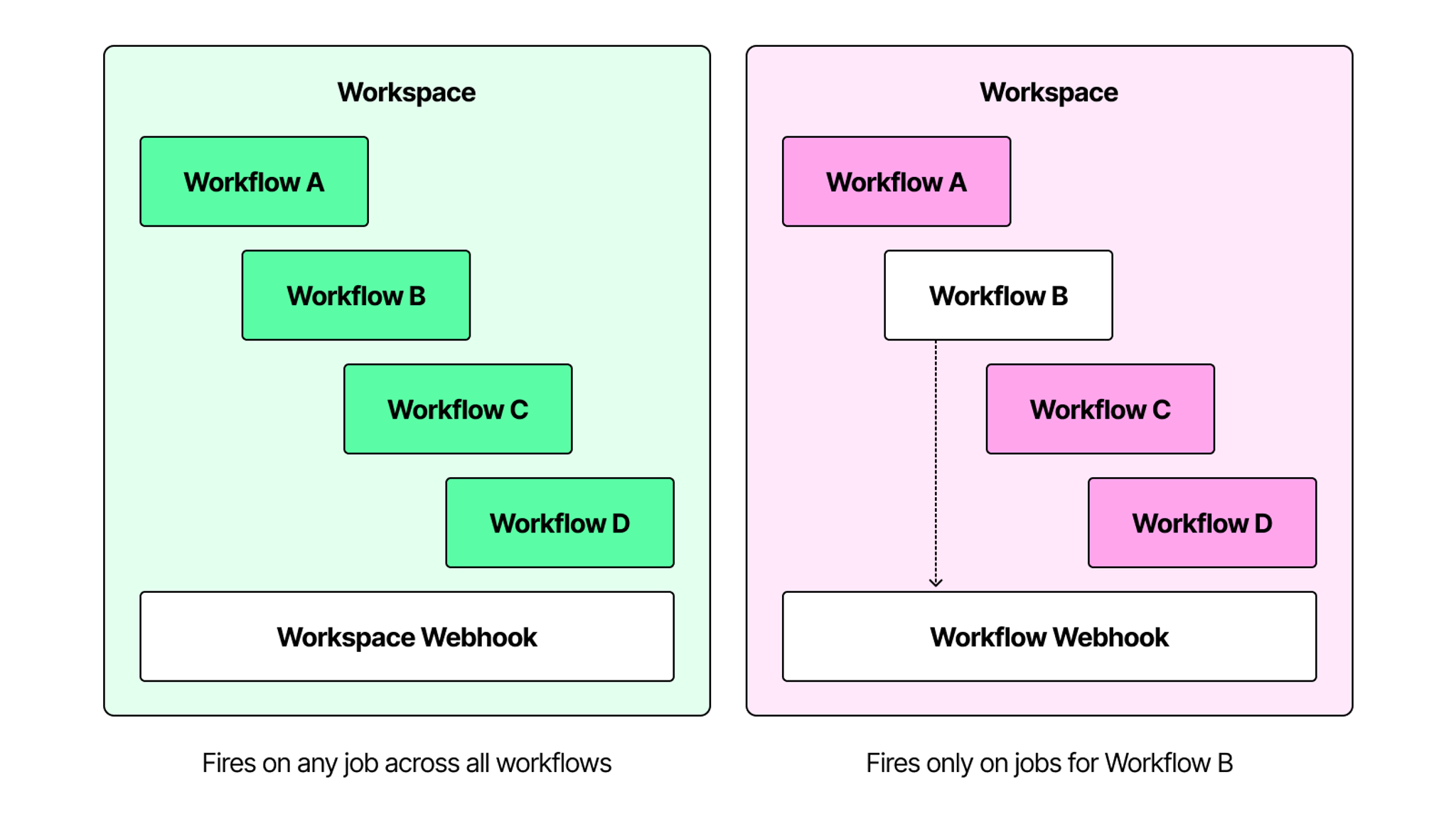
In Unstructured's API, both types are called notification channels. You create one by pointing it at an endpoint URL and specifying which events should trigger it. The difference is where you create it: workspace-scoped channels sit at the top level, workflow-scoped channels sit under a specific workflow.
Both types are available through the API. Workspace-scoped channels are also available directly in the Unstructured UI. Workflow-scoped channels are API only.
For the full reference on creating and managing notification channels, see the Unstructured webhooks documentation.
What you can build
The most immediate use is notification. A job completes and a message lands in Slack. A job fails and your on-call engineer gets paged. A long overnight run finishes and the analyst who needs the output finds out the moment it's ready. Any endpoint that accepts a POST request is a valid receiver — Slack, Discord, email providers, or a simple server you control.
The same pattern reaches outside Unstructured entirely. A job completes and your receiver triggers whatever comes next in your stack — a downstream process, a status update, a signal to another system that new data is ready. Unstructured finishes its part and everything else follows automatically.
Getting started
To create a workspace-scoped notification channel, you can use the Unstructured UI or the API directly. Workflow-scoped channels are API only.
The setup is a single call:
import os, requests
requests.post(
f"{os.getenv('UNSTRUCTURED_API_URL')}/notifications/channels",
headers={"unstructured-api-key":os.getenv("UNSTRUCTURED_API_KEY")},
json={
        "channel_type": "webhook",
        "url": "https://your-endpoint.com/webhook",
        "event_types": ["job.completed", "job.failed"],
        "description": "Production pipeline alerts"
    }
)
Point it at your endpoint, choose which events should trigger it, and optionally add a signing secret. Once it is created, matching job events start sending payloads immediately.
Every incoming request arrives with three headers: webhook-id, webhook-timestamp, and webhook-signature. Use these to verify that the request came from Unstructured and was not altered in transit. The full verification implementation is in the webhooks documentation.
Try it today
The fastest way to see webhooks in action is webhook.site. Set up a free receiver, create a notification channel, run a workflow, and watch the payload arrive. You can have a live webhook running in under ten minutes.
If you are not already on Unstructured, sign up for free and set up your first webhook today.