
Authors

If you’ve ever tried to feed an engineering schematic, a CAD export, or a complex blueprint into AI/ML pipelines, you know the pain.
You send a high-density visual document to a Vision-Language Model (VLM), and it gives you a great summary: "This is a diagram showing a system with labeled components and a table of specifications." That's useful for a demo, but it's useless for a production-grade system that needs to answer: "What is the exact value in cell B7 of the specifications table for component XYZ?"
To move from "cool demo" to "operational ROI," we need to stop asking AI to summarize documents and start asking it to reconstruct them with full structural fidelity.
Why Technical Drawings Break the Standard Document Stack
Most document processing pipelines treat a page as a linear flow of text. Technical drawings aren’t linear—they’re high-density ecosystems where meaning comes from structure, position, and context.
Here’s what makes them especially hard:
- Spatial Context Is Everything
- A number floating on a page is just a number. A number at (x: 450, y: 120) next to a “Pressure Valve” label is actionable data.
- Tables Are “Impossible”
- Engineering drawings are notorious for nested headers, merged cells, and non-standard layouts. Traditional CSV or Markdown exports flatten these into hallucinated columns and broken schemas.
- Overlapping Metadata
- Annotations often sit directly on top of geometry. Standard OCR loses the relationship between text, symbols, and the components they describe.
Our Approach: Multi-Pass High-Fidelity Reconstruction
At Unstructured, technical drawings are processed through a specialized three-pass pipeline designed to turn raw geometry into machine-readable intelligence.
1. High-Resolution Element Identification
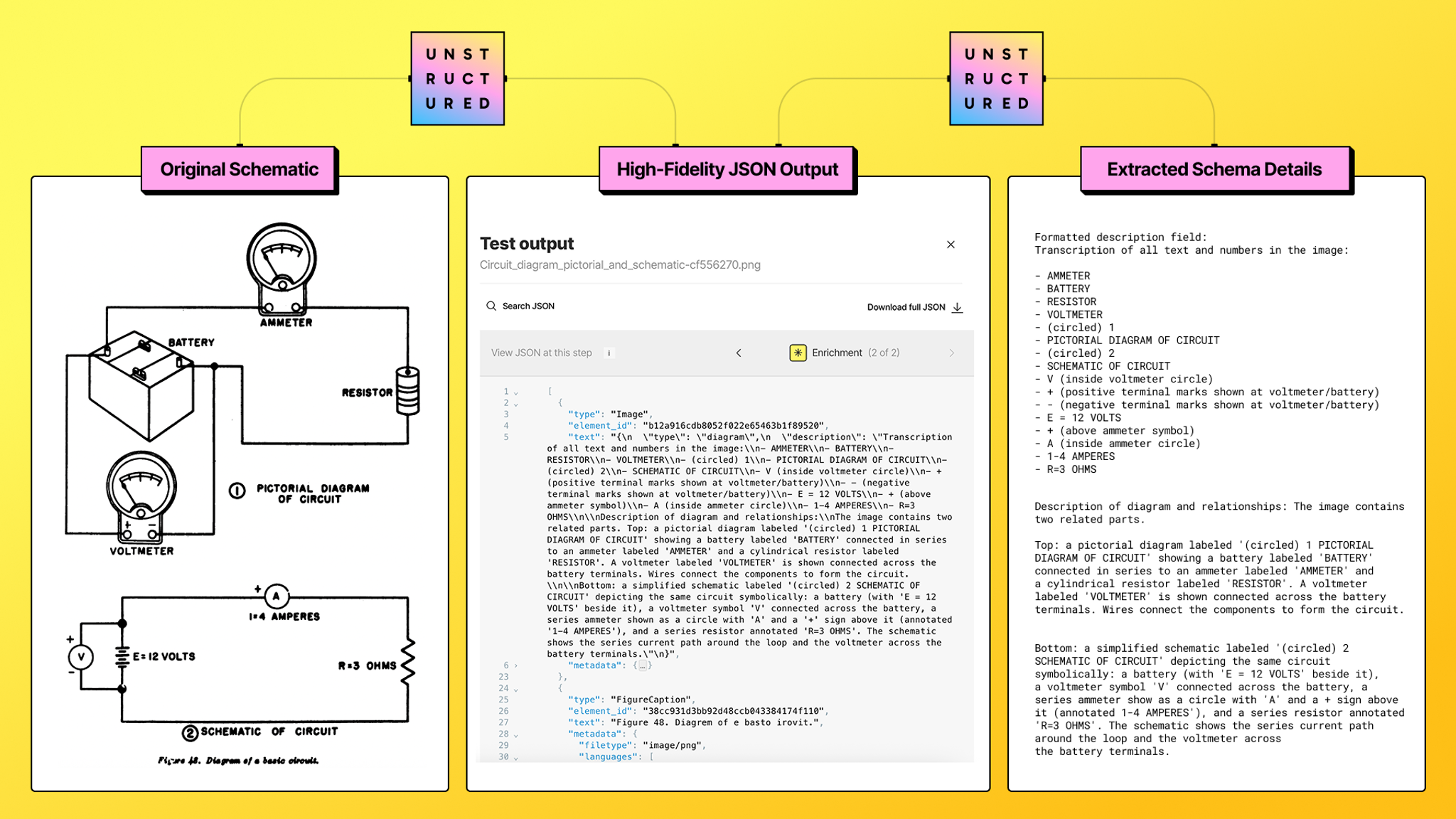
We don’t treat the page as a single image. Our high-resolution partitioner isolates every text string, numeric value, and symbol while preserving exact coordinate metadata. This guarantees that spatial relationships between labels, components, and values are never lost.
2. Multimodal Enrichment (The Semantic Glue)
Next, we layer in image-based enrichment using state-of-the-art vision reasoning models. This step adds semantic understanding: how components connect, what annotations refer to, and how visual elements relate to one another. Raw coordinates become meaningful technical facts.
3. Agentic Table Parsing (The Nested Breakthrough)
For complex engineering tables, we use Agentic Table Parsing. Instead of forcing tables into Markdown or CSV, we output them as HTML, which reliably preserves merged cells, nested headers, and non-standard hierarchies—critical for Bills of Materials (BOMs) and specification tables.
Optimizing Extraction: Auto vs. Hi-Res
You don’t need to build custom classifiers or routing logic.
- The “Auto” Pilot
- Set your partitioner to strategy="
auto", and Unstructured will automatically detect technical schematics and route them through the enhanced high-fidelity pipeline.
- The Power-User Configuration
- For extremely dense or critical drawings, explicitly use strategy="
hi_res" and enable Image Description EnrichmentandAgentic Table Parsingto guarantee maximum structural capture.
What You Get Out the Other End
The output is normalized, queryable JSON that you can search, filter, and analyze engineering data programmatically. This includes:
- Plain-language descriptions for semantic search
- Structured text with precise positional metadata
- Table outputs in HTML that preserve nested structure
What This Unlocks for Your AI Roadmap
- Fact-Grounded RAG: Your agents can answer precise technical questions grounded in extracted facts and point directly to the exact location on a blueprint.
- Scalable Analytics: Extract structured data at scale to build time-series datasets or aggregate part specifications across thousands of historical drawings.
- High-Quality Fine-Tuning: Generate domain-specific instruction datasets with precise technical language and exact positional grounding.
Getting Started
Support for technical drawings is live in production.
- Use partitioner=
autoto let the system detect and route drawings automatically - Use partitioner=
hi_reswhen you need guaranteed deep extraction for complex schematics
If technical drawings have been the weak link in your AI pipeline, this closes the gap.
Want to see it working end-to-end? Sign up for Unstructured and try one of your hardest schematics today.
FAQ
Why can't standard OCR or text extraction tools handle engineering drawings reliably?
Engineering drawings are not linear documents. Meaning is encoded in spatial relationships, positional context, and visual structure, so a number or label only becomes useful data when its location relative to other elements is preserved. Standard OCR treats a page as a flat stream of text, which destroys the structural relationships that make engineering data actionable.
What is Agentic Table Parsing, and why does it matter for engineering data?
Agentic Table Parsing is an approach that reconstructs complex tables as HTML rather than forcing them into Markdown or CSV. This matters for engineering drawings because specification tables and Bills of Materials frequently contain merged cells, nested headers, and non-standard layouts that flat formats cannot represent without data loss or hallucinated columns.
How does Unstructured handle the routing of technical drawings without requiring custom classification logic?
When the partitioner is set to strategy="auto", Unstructured automatically detects technical schematics and routes them through its enhanced high-fidelity pipeline. For dense or critical drawings where maximum structural capture is required, setting strategy="hi_res" and enabling Image Description Enrichment and Agentic Table Parsing gives explicit control over the extraction depth.
What does Unstructured output after processing an engineering drawing, and how is it used downstream?
The output is normalized, queryable JSON that includes plain-language descriptions for semantic search, structured text with precise coordinate metadata, and HTML-formatted tables that preserve nested structure. This format is designed to feed directly into RAG pipelines, analytics systems, or fine-tuning workflows without additional transformation steps.
What types of AI applications become possible once engineering drawings are converted to structured data?
Structured engineering data enables retrieval-augmented generation systems to answer precise technical questions grounded in specific document locations, supports large-scale analytics by aggregating part specifications across thousands of historical drawings, and provides high-quality training material for domain-specific model fine-tuning.